Service Users
In addition to configuring your operatives for maintenance tasks, it’s also possible to designate an operative as a Service User.
As a Service User, the operative can interact with Building Book’s Meter Monitor system to enter manual readings and upload related images. Access to specific meters is managed within Building Book's Meter Monitor system in the Energy Management Dashboard.
Designating a Service User
To designate a maintenance operative as a Service User, click the icon in the "Options" column of their row in the operatives list.

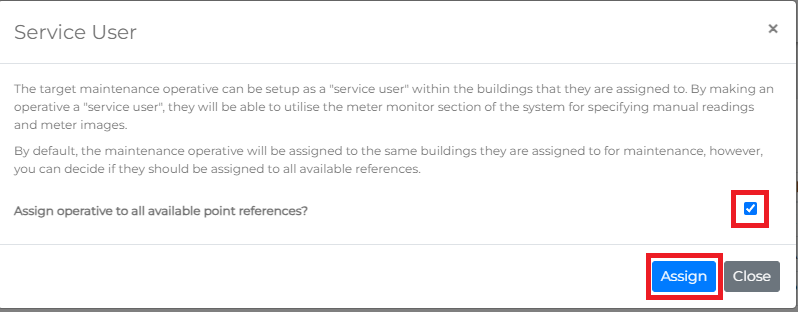
A prompt will appear with a description of this action. By default, this will assign the operative to all manual point references available for the buildings they are currently assigned to.
These point references are meters added to the Meter Monitor system, allowing manual readings to be taken for them.
Note: If meters or point references change, or if new points are added, you must update the operative’s meter assignments by repeating this designation process.
Click the Assign button to complete the assignment. The operative will now have permission to take meter readings for the assigned points.
Updating Service User Point References
The Service User point references can also be updated when modifying the operative's Building Assignment. To do this, check the Update Operative's Service User Assignment checkbox. This will ensure that any newly assigned buildings have their relevant point references added for the operative to access.
