Operative Chargeable Rates
Operative charge rates are managed from the Chargeable Rates tab in the Operative Management View.
Charge Rates represent the default rates at which an operative will be charged out to a customer. These values are used in financial reports and to assess the profitability of your maintenance contracts and tasks. For configuring cost rates, please see here.
Note: In most cases, charge rates will be overridden by the contract the operative is billed under. However, these default rates will be used as fallback values if there is no specific rate set in a maintenance contract.
Adding an Operative's Chargeable Rate
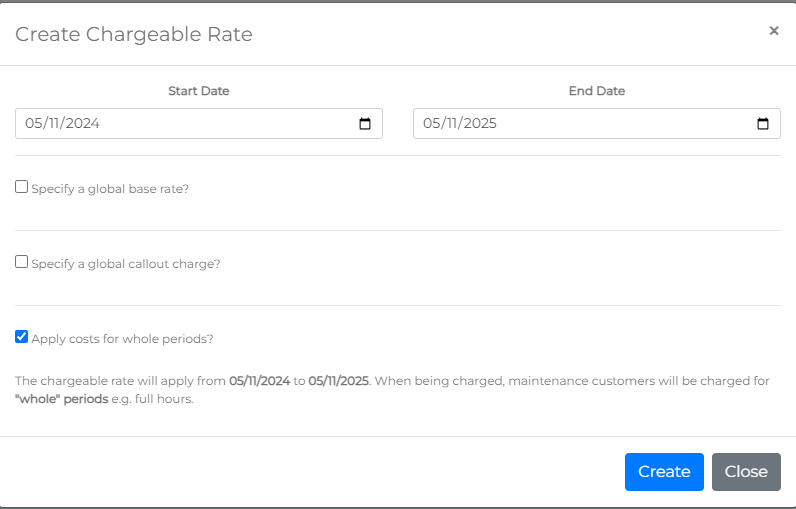
To add a charge rate for an operative, click the Add Chargeable Rate Period button. This will open the Create Chargeable Rate form.

Each chargeable rate must be configured for a specific period (default is one year from today). You can adjust this period as needed, but note that charge rate periods cannot overlap.
Required Fields
- Start Date: The first date the charge rate will apply.
- End Date: The last date the charge rate will apply.
The form is then divided into sections, depending on how you want to configure the charge rate.
Specify a Global Base Rate
- Base Rate (£): The amount to be charged per Base Period.
- Base Period (Minutes): The time in minutes for which the base rate applies.
Example: A base rate of £100 per 60 minutes would result in a 2-hour (120-minute) task being charged at £200.

Specify a Global Callout Charge
Callout charges apply to reactive tasks (not planned maintenance).
- Callout Charge (£): The fixed rate that will be charged for each callout, covering the Minimum Period.
- Minimum Period (Minutes): The minimum time in minutes covered by the callout charge.
Example: A callout charge of £300 for 120 minutes means the first 120 minutes of a callout will be charged at £300. If a task takes 3 hours (180 minutes), the charge would be:
- First 120 minutes = £300
- Additional 60 minutes at £100/hour (assuming a £100 base rate) = £100
- Total Charge: £400
If the task only takes 45 minutes, it would still be charged at the minimum callout period of 120 minutes, totaling £300.

Apply Charge for Whole Periods
Checking the Apply Charge for Whole Periods checkbox means any period less than the base period will be charged at the full base rate.
Example: With a base rate of £50 for a 60-minute period:
- If a task takes 1 hour and 30 minutes, it would be charged as two full periods (120 minutes), totaling £100.
If the Apply Charge for Whole Periods option is unchecked, the system will prorate the second period:
- First hour = £50
- Remaining 30 minutes = £25 (prorated)
- Total Charge: £75

Chargeable Rate Summary
Under the Apply Charge for Whole Periods checkbox, you’ll see a system-generated summary of the chargeable rate before saving.
Click the blue Create button to save the charge rate.

Viewing Operative Chargeable Rates
A table of an operative’s chargeable rates can be viewed in the Chargeable Rates tab.

Removing a Chargeable Rate
To remove a chargeable rate, click the Remove link in the options column. Please note, due to the simplicity of adding chargeable rates, there is no confirmation prompt for removal. A toast message will confirm the result of the action.